Spring Boot Runners – Introduction
The main purpose of the Spring boot Runners is to execute a block of code once automatically immediately after loading the Spring boot application.
In Spring Boot Applications, Spring boot runners will be executed only one time.
In general, in Spring boot applications, if we want to override the configurations data which we provided in the properties file or yaml files , if we want to override the default configurations which we have in the Spring boot then we have to use Spring Boot Runners.
In Spring boot applications, to hold the command Line arguments we will use Spring Boot Runners.
Spring boot has provided the following two types of Runners.
- CommandLineRunner
- ApplicationRunner
CommandLineRunner
CommandlineRunner is an interface provided by Spring boot 1.0 version, it is able to take all the types of command line inputs in the form of String values in a String[].
There are two types of Command Line Inputs.
Option Arguments
These are the command Line inputs in the form of Key-value pairs.
EX:
––server.port = 123
––application.name = SpringBootApplication
Non Option Arguments
These are the Command Line inputs in the form of Single values.
EX: start, stop, pause,...
CommandLineRunner is unable to provide separation between the Option arguments and non Option arguments.
CommandLineRunner is a functional interface, it has the following abstract method.
public void run(String[] args)
If we want to use CommandLineRuner in Spring boot applications then we have to use the following steps.
- Prepare a user defined Class.
- Provide @Component annotation over the user defined class.
- Implement CommandLinerunner class.
- Implement run() method in the user defined class.
Example :
User defined class – WelcomeRunner.java
package com.durgasoft.app05.runners;

import org.springframework.boot.CommandLineRunner;
import org.springframework.stereotype.Component;

@Component
public class WelcomeRunner implements CommandLineRunner {
   @Override
   public void run(String... args) throws Exception {
       System.out.println("Welcome To CommandLineRunner class...");
   }
}
App05Application.java
package com.durgasoft.app05;

import org.springframework.boot.SpringApplication;
import org.springframework.boot.autoconfigure.SpringBootApplication;

@SpringBootApplication
public class App05Application {
   public static void main(String[] args) {
       SpringApplication.run(App05Application.class, args);
       System.out.println("Welcome To Spring Boot Main Class....");
   }
}
pom.xml
<?xml version="1.0" encoding="UTF-8"?>
<project xmlns="http://maven.apache.org/POM/4.0.0" xmlns:xsi="http://www.w3.org/2001/XMLSchema-instance"
        xsi:schemaLocation="http://maven.apache.org/POM/4.0.0 https://maven.apache.org/xsd/maven-4.0.0.xsd">
   <modelVersion>4.0.0</modelVersion>
   <parent>
       <groupId>org.springframework.boot</groupId>
       <artifactId>spring-boot-starter-parent</artifactId>
       <version>3.3.1</version>
       <relativePath/> <!-- lookup parent from repository -->
   </parent>
   <groupId>com.durgasoft</groupId>
   <artifactId>app05</artifactId>
   <version>0.0.1-SNAPSHOT</version>
   <name>app05</name>
   <description>app05</description>
   <properties>
       <java.version>17</java.version>
   </properties>
   <dependencies>
       <dependency>
           <groupId>org.springframework.boot</groupId>
           <artifactId>spring-boot-starter-web</artifactId>
       </dependency>
       <dependency>
           <groupId>org.springframework.boot</groupId>
           <artifactId>spring-boot-starter-test</artifactId>
           <scope>test</scope>
       </dependency>
   </dependencies>

   <build>
       <plugins>
           <plugin>
               <groupId>org.springframework.boot</groupId>
               <artifactId>spring-boot-maven-plugin</artifactId>
           </plugin>
       </plugins>
   </build>
</project>
Output :
Welcome To CommandLineRunner class...
Welcome To Spring Boot Main Class....
When we execute the above project , Spring Boot Application will perform the following actions.
- Spring Boot Project will be loaded.
- Spring Boot Framework will execute the main() method of the Spring boot Main class.
- Spring Boot Framework will execute SpringApplicatioin.run() method.
- SpringApplication.run() method will recognize all the Runner classes and it will execute all the runner classes.
Command line arguments to Spring Boot application
To provide command Line arguments to the Spring Boot applications we have to use the following steps.
- Open “Edit the run configuration” by clicking on the … at run option.
- Select the More Actions.
- Select Program Arguments
- Provide the command Line arguments by providing a space separator.
- Click on the run button.
WelcomeRunner.java
package com.durgasoft.app05.runners;

import org.springframework.boot.CommandLineRunner;
import org.springframework.stereotype.Component;

@Component
public class WelcomeRunner implements CommandLineRunner {
   @Override
   public void run(String... args) throws Exception {
       for(String arg: args){
           System.out.println(arg);
       }
   }
}
App05Application.java
package com.durgasoft.app05;

import org.springframework.boot.SpringApplication;
import org.springframework.boot.autoconfigure.SpringBootApplication;

@SpringBootApplication
public class App05Application {
   public static void main(String[] args) {
       SpringApplication.run(App05Application.class, args);
       System.out.println("Welcome To Spring Boot Main Class....");
   }
}
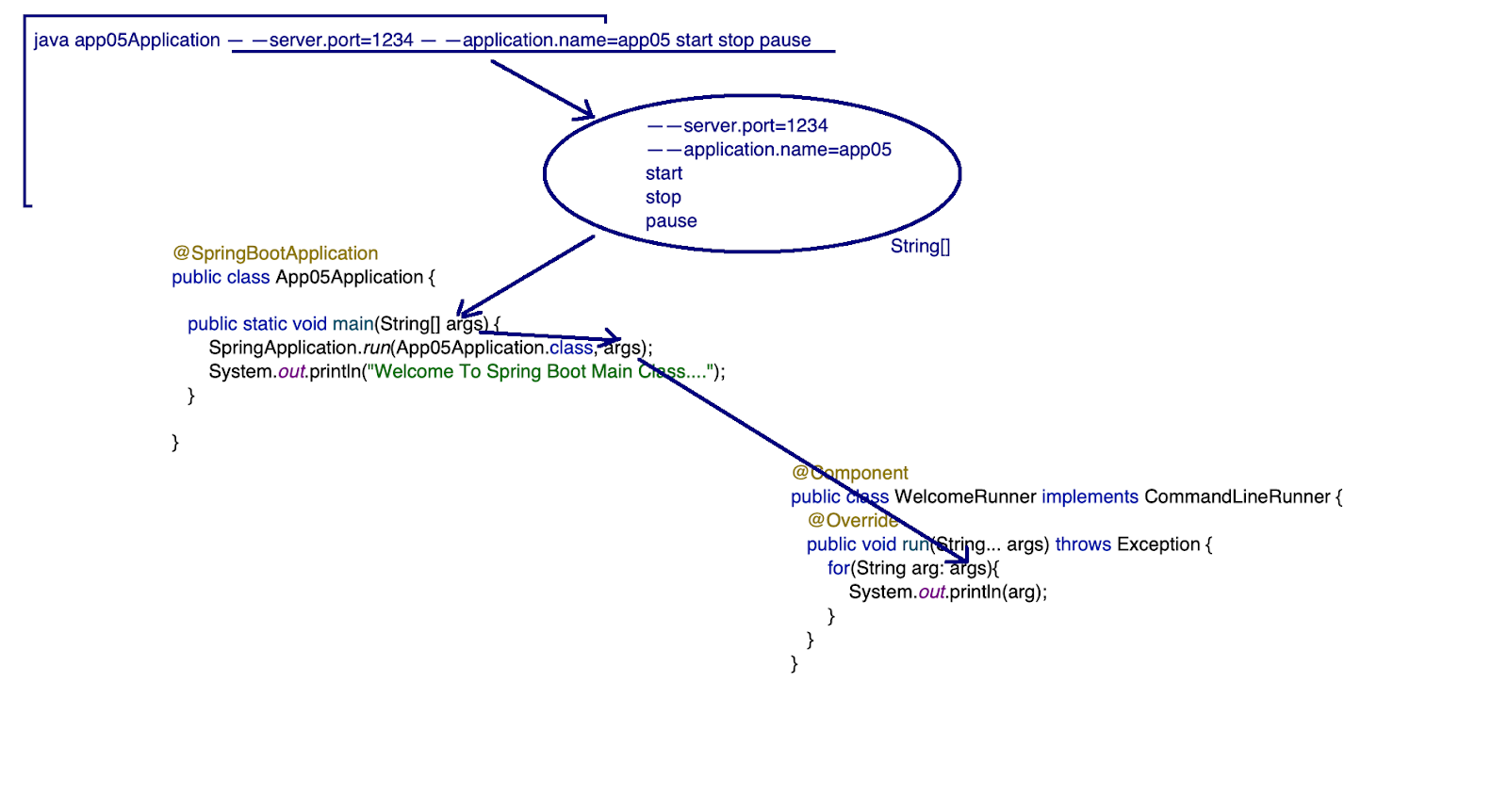
Output :
 --server.port=1234
start
stop
pause
edit
Welcome To Spring Boot Main Class....
In Spring Boot Applications, we are able to provide more than one runner class, but all the runner classes are executed by the Spring Boot framework in its own order as per the internal implementation of the Spring Boot.
Note: If we execute the Spring Boot application again and again, the order of the Runner classes execution will be varied.
package com.durgasoft.app05.runners;

import org.springframework.boot.CommandLineRunner;
import org.springframework.stereotype.Component;

@Component
public class WelcomeRunner implements CommandLineRunner {
   @Override
   public void run(String... args) throws Exception {
       System.out.println("Hello User!, this is from WelcomeRunner!");
   }
}

package com.durgasoft.app05.runners;

import org.springframework.boot.CommandLineRunner;
import org.springframework.stereotype.Component;

@Component
public class HelloRunner implements CommandLineRunner {
   @Override
   public void run(String... args) throws Exception {
       System.out.println("Hello User!, this is from HelloRunner!");
   }
}

package com.durgasoft.app05.runners;

import org.springframework.boot.CommandLineRunner;
import org.springframework.stereotype.Component;

@Component
public class WishRunner implements CommandLineRunner {
   @Override
   public void run(String... args) throws Exception {
       System.out.println("Hello User!, This is from WishRunner");
   }
}

package com.durgasoft.app05;

import org.springframework.boot.SpringApplication;
import org.springframework.boot.autoconfigure.SpringBootApplication;

@SpringBootApplication
public class App05Application {
   public static void main(String[] args) {
       SpringApplication.run(App05Application.class, args);
   }
}
Output :
Hello User!, This is from WishRunner
Hello User!, this is from HelloRunner!
Hello User!, this is from WelcomeRunner!
In Spring Boot applications, if we want to execute all theRunner classes in particular then we have to use @Order annotation with the Runner classes.
@Order : No particular Order
@Order(PriorityValue) : In a Particular Order.
If the priority Value is less, then the respective Runner class will get more priority and the respective runner class will be executed first.
If the priority Value is more, then the respective Runner class will get less priority and the respective runner class will be executed last.
package com.durgasoft.app05.runners;

import org.springframework.boot.CommandLineRunner;
import org.springframework.stereotype.Component;

@Order(2)
@Component
public class WelcomeRunner implements CommandLineRunner {
   @Override
   public void run(String... args) throws Exception {
       System.out.println("Hello User!, this is from WelcomeRunner!");
   }
}

package com.durgasoft.app05.runners;

import org.springframework.boot.CommandLineRunner;
import org.springframework.stereotype.Component;

@Order(3)
@Component
public class HelloRunner implements CommandLineRunner {
   @Override
   public void run(String... args) throws Exception {
       System.out.println("Hello User!, this is from HelloRunner!");
   }
}

package com.durgasoft.app05.runners;

import org.springframework.boot.CommandLineRunner;
import org.springframework.stereotype.Component;

@Order(1)
@Component
public class WishRunner implements CommandLineRunner {
   @Override
   public void run(String... args) throws Exception {
       System.out.println("Hello User!, This is from WishRunner");
   }
}

package com.durgasoft.app05;

import org.springframework.boot.SpringApplication;
import org.springframework.boot.autoconfigure.SpringBootApplication;

@SpringBootApplication
public class App05Application {
   public static void main(String[] args) {
       SpringApplication.run(App05Application.class, args);
   }
}
Output :
Hello User!, This is from WishRunner
Hello User!, this is from WelcomeRunner!
Hello User!, this is from HelloRunner!
Q) If we provide the same priority value to the @Order annotation in all the Runner classes then in which order the Runner classes would be executed?
If we provide the same priority value to the @Order annotation in all the Runner classes then the Spring Boot Framework will execute all the Runner classes in its own order like random order, not in a particular order.
ApplicationRunner
ApplicationRunner is a Spring boot Runner, it is able to take all the types of Command Line Arguments including Option Arguments and Non Option Arguments , but it will manage the Option Arguments and Non option Arguments separately.
ApplicationRunner is a Functional Interface, it has the following method.
public void run(ApplicationArguments args)
Where the ApplicationArguments is able to manage all the command line arguments separately like Option Arguments Separately and non Option Arguments Separately.
If we want to get all the names of the Option arguments then we have to use the following method.
public Set getOptionNames()
If we want to get all the values of a particular Option Argument then we have to use the following method.
public List getOptionValues(String name)
If we want to check whether the argument name is available in the Option Arguments or not then we have to use the following method.
public boolean containsOption(String name)
If we want to get all the non option arguments separately then we have to use the following method.
public List getNonOptionArguments()
Example
TestRunner.java
package com.durgasoft.app06.runner;

import org.springframework.boot.ApplicationArguments;
import org.springframework.boot.ApplicationRunner;
import org.springframework.stereotype.Component;

@Component
public class TestRunner implements ApplicationRunner {
   @Override
   public void run(ApplicationArguments args) throws Exception {
       System.out.println("Hello User!, This is from ApplicationRunner");
       System.out.println("Option Names     : "+args.getOptionNames());
       System.out.println("application.name : "+args.getOptionValues("application.name"));
       System.out.println("Non Option Values: "+args.getNonOptionArgs());
       System.out.println("server.port Existed : "+args.containsOption("server.port"));
   }
}
App06Application.java
package com.durgasoft.app06;

import org.springframework.boot.SpringApplication;
import org.springframework.boot.autoconfigure.SpringBootApplication;

@SpringBootApplication
public class App06Application {
   public static void main(String[] args) {
       SpringApplication.run(App06Application.class, args);
       System.out.println("Hello User!, This is Spring boot Entry class");
   }
}
Output :
Hello User!, This is from ApplicationRunner
Option Names     : [server.port, application.name]
application.name : [testapp]
Non Option Values: [start, stop, pause]
server.port Existed : true
Hello User!, This is Spring boot Entry class
In a Single Spring boot application, it is possible to provide more than one application runner, but they will be executed in a random order, if we want to execute all the Runner classes in a particular order then we have to use @Order(priorityValue) annotation.
In a Single Spring boot application, it is possible to provide both CommandLineRunner and ApplicationRunner, they will be executed in a random order, but if we use @Order(PriorityValue) annotation over the Runner classes then they will be executed as per the priority values.
CommandLineRunner v/s ApplicationRunner
- CommandLineRunner was introduced in SpringBoot 1.0 version.
AppliactionRunner was introduced in SpringBoot 1.3 version - CommandLineRunner is a functional interface and it has the following method.
public void run(String … args)
ApplicationRunner is a functional interface and it has the following method.
public void run(ApplicationArguments args) - CommandLineRunner is able to manage all the arguments in the form of String values, no separation between option arguments and Non-Option arguments.
ApplicationRunner is able to manage option arguments and Non-Option arguments separately.